Ads 468x60px

Showing posts with label Programming. Show all posts

Saturday, 19 January 2013

Finding Sum of Two Matrix C++ Program

This program will firstly ask the user to input the number of rows and columns of the matrix that he want to add then the program will ask to user to enter the elements of the matrix after taking the input it will display the matrix that entered with the sum. 

#include<iostream.h>
#include<conio.h>
void main()
{
 clrscr();
 //variables
 int r,c, mat1[10][10], mat2[10][10], sum[10][10];
 int i,j;

 //input part begin
 cout<<"Enter the number of rows:\t";
 cin>>r;
 cout<<"Enter the number of columns:\t";
 cin>>c;
 cout<<"Enter the elements of the matrix 1:\n";

 for(i=0;i<r;i++)
 {
  for(j=0;j<c;j++)
  {
   cout<<"Row "<<i+1<<", Column "<<j+1<<":\t";
   cin>>mat1[i][j];
  }
 }

 cout<<"Enter the elements of the matrix 2:\n";

 for(i=0;i<r;i++)
 {
  for(j=0;j<c;j++)
  {
   cout<<"Row "<<i+1<<", Column "<<j+1<<":\t";
   cin>>mat2[i][j];
  }
 }
 //input parts end

 //displaying the matrices entered

 cout<<"Matrix 1:\n";
 for(i=0;i<r;i++)
 {
  for(j=0;j<c;j++)
  {
   cout<<mat1[i][j];
   cout<<"\t";
  }
  cout<<endl;
 }

 cout<<"Matrix 2:\n";
 for(i=0;i<r;i++)
 {
  for(j=0;j<c;j++)
  {
   cout<<mat2[i][j];
   cout<<"\t";
  }
  cout<<endl;
 }

 //calculation part begin
 cout<<"The sum of the matrices are:\n";
 for(i=0;i<r;i++)
 {
  for(j=0;j<c;j++)
  {
   sum[i][j]=mat1[i][j]+mat2[i][j];
  }
 }
 //calculation part end

 //displaying the sum in matrix form
 for(i=0;i<r;i++)
 {
  for(j=0;j<c;j++)
  {
   cout<<sum[i][j];
   cout<<"\t";
  }
  cout<<endl;
 }
 getch();
}
Any queries regarding this code, feel free to ask by commenting here.. 

C++ Program to Reverse an Integer

This program will ask user to input a number and then it will calculate the reverse of the number and print that as the output. Data type long int is used in this program. 
#include<iostream.h>
#include<conio.h>
void main()
{
 clrscr();
 long int num,r=0;
 cout<<"Enter an integer:\t";
 cin>>num;
 while(num>0)
 {
  r=r*10;
  r=r+num%10;
  num=num/10;
 }
 cout<<"\nThe Revers of the number is "<<r<<endl;
 getch();
}
Explanation of the program
Two variables are declared one is for the number which is to be reversed and that will be defined by the user as an input and the other is r in which we will store the reverse of the number. 
Now the main task is happening in the loop, while loop is used in this program. 
Suppose we entered 123 
Now num = 123
The expression of while loop is true (123 is greater than 0); the control will come inside the loop and will execute the following statement
{
 r=r*10;
 r=r+num%10;
 num=num/10;
}
Now dry run it in your mind. 
r is initialized by 0 at the starting of the program, so we have the values 
r = 0;
num = 123;
Now calculate what will happen 
the value of r become 0 in first line. 
Then it will become 3
r = 0 + 123 % 10; 
r = 0 + 3;
r = 3
Now in the last statement num will become 12
num = 123 / 10;
num = 12
Because we have taken the data type as int so it will not take the decimal value. 
Now all the statements has executed so the loop will again check its expression which is again true (12 is greater than 0), so the control will again come inside the loop and will execute the statements with updated values, this process will continue until the expression in while don't become false and at last it will print the reversed value as the output. 

Tuesday, 15 January 2013

Fibonacci Series C++ Program

This code will ask the user to enter the length of  the series that he want to generate, once the user will give the length then the program will generate the Fibonacci series.
#include<iostream.h>
#include<conio.h>

void main()
{
 clrscr();
 int a=0,b=1,c,r,i;
 cout<<"Enter the length:\t";
 cin>>r;
 cout<<a<<"\t"<<b<<"\t";
 for(i=0;i<r;i++)
 {
  c=a+b;
  cout<<c<<"\t";
  a=b;
  b=c;
 }
 getch();
}

Monday, 14 January 2013

Calculator Program C++

This program will
Add n number of terms according to your wish, 
Subtract n number of terms according to your wish,
Multiply n number of terms according to your wish, 
Divide two terms, 
Determine factorial of an integer and
Determine power of an integer
#include<iostream.h>
#include<conio.h>
#include<stdlib.h>

class calc
{
 float a,b,r,t;
 int i,x,y;
 long int f, p;
 long double f1;
 public:
 void add();
 void subtract();
 void multiply();
 void divide();
 void factorial();
 void power();
}cal;
 
void calc::add()
{
 cout<<"How many terms you need to add?\n";
 cin>>t;
 
 r=0;
 for(i=0;i<t;i++)
 {
  cout<<"Enter term "<<i+1<<":\t";
  cin>>a;
  r=r+a;
 }
 
 cout<<"Sum = "<<r<<endl;
}

void calc::subtract()
{
 cout<<"Enter the largest term:\t";
 cin>>b;
 
 cout<<"How many terms you need to subtract?\n";
 cin>>t;
 
 r=b;
 for(i=0;i<t;i++)
 {
  cout<<"Enter term "<<i+1<<":\t";
  cin>>a;
  r=r-a;
 }
 
 cout<<"Result = "<<r<<endl;
}

void calc::multiply()
{
 cout<<"How many terms you need to multiply?\n";
 cin>>t;
 
 r=1;
 for(i=0;i<t;i++)
 {
  cout<<"Enter term "<<i+1<<":\t";
  cin>>a;
  r=r*a;
 }
 
 cout<<"Result = "<<r<<endl;
}

void calc::divide()
{
 cout<<"If you need to divide a with b then\n";
 cout<<"Enter the value of a:\t";
 cin>>a;
 
 cout<<"Enter the value of b:\t";
 cin>>b;
 
 r=a/b;
 cout<<"Result = "<<r<<endl;
}

void calc::factorial()
{
 cout<<"Enter the value:\t";
 cin>>x;
 
 if(x<12)
 {
  f=1;
  for(i=1;i<=x;i++)
  {
   f=f*i;
  }
  cout<<"Factorial = "<<f<<endl;
 }
 else
 {
  f1=1;
  for(i=1;i<=x;i++)
  {
   f1=f1*i;
  }
  cout<<"Factorial = "<<f1<<endl;
 }
}

void calc::power()
{
 cout<<"Enter the base value:\t";
 cin>>x;
 
 cout<<"Enter the power value:\t";
 cin>>y;
 
 p=1;
 for(i=1;i<=y;i++)
 {
  p=p*x;
 }
 cout<<endl<<x<<" to the power "<<y<<" is "<<p;
 cout<<endl;
}

int main()
{
 int choice;
 while(1)
 {
  cout<<"Enter your choice\n";
  cout<<"1. Addition\n2. Subtraction\n"; 
  cout<<"3. Multiplication\n4. Division\n";
  cout<<"5. Factorial\n6. Power\n7. Exit\n";
  cin>>choice;
  
  switch(choice)
  {
   case 1: cal.add();break;
   case 2: cal.subtract();break;
   case 3: cal.multiply();break;
   case 4: cal.divide();break;
   case 5: cal.factorial();break;
   case 6: cal.power();break;
   case 7: exit(0);
   default:  cout<<"Invalid Input\nTry Again!!\n";
  }
 }
}
Any confusion regarding this code then feel free to ask by commenting here... 

Some Exercises with Programming in C++

We learn a lot about C++ so far. Now we should try to solve some problems. 

Here are the problems.  

1. Write a program to make a calculator.  
2. Write a program to print Fibonacci series. 
3. Write a program to find reverse of a given number. 
4. Write a program to add two matrix. 
5. Write a program to multiply  two matrix. 

6. Write a program to find transpose of a matrix. 

7. Write a program which will find sum of rows and columns in a matrix and display the result rows and column-wise in the output screen. 

8. Write a program to find both right and left diagonal in a matrix and sum of the each diagonal elements. 

9. Write a program to find the reverse of a string. 

10. Write a program to to find the length of a string. 

11. Write a program to find the characters in a string. 

12. Write a program to print the string in proper case, title case, lower case and upper case. 

13. Write a program to check the word is palindrome or not. 

14. Write a program to check the number is palindrome or not.

15. Write a program to sort integers. 

16. Pattern Programs. 

The answers will be posted soon but you should try to solve the problems by your own. 

Features of OOP

Let us look at the features, 
We will make an attempt to understand the above from a logical point of view. 

Encapsulation
The example of a TV set is often taken to illustrate objects and characteristics of OOP. The TV receiver is totally encapsulated. We cannot see the components inside or meddle with them. However, we can use the TV set easily. We can switch it on and select channels with the external interfaces provided in the receiver. This is the concept of encapsulation of objects in an OOP. 
Wrapping together data and functions creates the objects in OOP. They are bound together. This represents encapsulation in OOP. We can use the encapsulated objects through the designated interfaces only. Thus, the inner parts of the program are sealed or encapsulated to protect from accidental tampering. This feature is not available in the conventional procedure oriented programming languages where data can be corrupted since it is easily accessible. In C++, like other object oriented programming languages such as Java and C#, encapsulation is achieved through what is known as classes. 

A Class is a blueprint for making a particular kind of object, It defines the specifications for construction an object with data and function. It is generally specifies the private working of objects and their public interfaces. The data, known as data members, defines the state of the proposed object and function of its behavior. 

The class is used to declare two types of members:
1. Data 
2. Functions

Data are nothing but declaration of variables for holding data, Functions, called member functions, contain sequence of instructions that operate on the data. An object is nothing but a variable of type class. it is a self contained computing entity with its own data and functions. This means that an object will have its own copy of the variables. However, the functions being common to all the objects do not need to be kept in each object. 

Note carefully that a class can give rise to a number of objects, but is not an object on its own. It is only a structure or blueprint which helps in creating replicas with common structures, but different characteristics. This means, two objects of a class with different names will have same variable names but with different values i.e., they have the same data type but different data. In some special cases, two objects can also have same data. A class is a framework for proper encapsulation of objects. The data members of the objects can be accessed only through the interface available in public. 

Syntax for declaring a class
class class_name
{
   data's;
   functions;
};
Suppose we need to create a class for student the we will write
class student
{
  char name[20];
  int roll_no;
  char sec;
  
  public:
  void student_details()
  {
    cout<<"Enter name:\t";
    gets(name);
    cout<<"Enter Roll Number:\t";
    cin>>roll_no.;
    cout<<"Enter Section:\t";
    cin>>sec;
  }
};
This is a class name student which will store a student's name, roll number and section. Now the function is declared under public, because we need a main function for the execution of program and if the function is private then main function has not the permission to access the function so your program will give an error that function is inaccessible so we need to declare the function in public. Now for accessing anything under a class you need an object of that class and that is called encapsulation. When we create object of a class all the data of that class is encapsulated under a single object called encapsulation. 
class student
{
  char name[20];
  int roll_no;
  char sec;
  
  public:
  void student_details()
  {
    cout<<"Enter name:\t";
    gets(name);
    cout<<"Enter Roll Number:\t";
    cin>>roll_no.;
    cout<<"Enter Section:\t";
    cin>>sec;
  }
};

void main()
{
  student obj;
  obj.student_details():
}
The syntax for creating an object is
class_name object_name;
As we did above, and for accessing anything from class the syntax is
object_of_that_class.element_of_that_class
In object part we have to write the object name which we created for that class and after than we need to place a dot ( . ) and then have to write the element which we want to access, the element can be anything from that class e.g. functions and variables. The element will only be accessible when public. 

Abstraction
Data abstraction refers to, providing only essential information to the outside word and hiding their background details i.e. to represent the needed information in program without presenting the details.
For example, a database system hides certain details of how data is stored and created and maintained. Similar way, C++ classes provides different methods to the outside world without giving internal detail about those methods and data.

Data Hiding
Related to the idea of encapsulation is the concept of data hiding. Encapsulation can hide data from classes and functions in other classes. In the example of the class Transport, we can access the three data members through the member function set_values(). Although there may be many other attributes and data elements in the class Transport, these are all hidden from view. This makes programs more reliable since declaring a specific interface, such as public or private, to an object prevents inadvertent access to data in ways that it was not designed for. In C++, access to an object and its encapsulated data and functions is treated very carefully using the keywords private, protected and public. The programmer has the facility to decide the access specifications for data objects and functions as being private, protected and public while defining a class. Only when the declaration is public can other functions and objects access the object and its components without question on the other hand if the declaration is private there is no possibility of such access. When the declaration given is protected, access to data and functions in a class by others is not as free as when it is public, not as restricted as when it is private. You can declare one base class as being derived from another, which will be discussed shortly. 

Inheritance 
A software object does not exist by itself; it is always an instance of a class. A class gives a blueprint for building a software object and can inherit the features of another class and add its own modifications. Inheritance is similar to human beings. A child can inherit his/her father's property and add/acquire more properties; he/she can modify the inherited property; or dispose of a property. In a similar manner, a new class can inherit its properties from another existing class. 
A class can have a child, which means one class can be derived from another. The original or parent class is known as the base class and the child class is known as the derived class. 

Polymorphism
Polymorphism is a useful concept in OOP languages, In simple terms it means one name, many duties. It provides a common interface to carry out similar tasks. In other words, a common interface is created for accessing related objects. This facilitates the objects to become interchangeable black boxes. hence they can be used in other programs as well. Therefore, polymorphism enables reuse of objects built with a common interface. 

Overloading
The concept of overloading is also a branch of polymorphism. When the exiting operator or function is made to operate on new data type it is said to be overloaded.

Sunday, 13 January 2013

Object Oriented Programming Systems

Object Oriented Programming Systems (OOPS) are widely used in software development projects. C++ is one of the early OOPS. Using OOPS for program development reduces programming errors and improves their quality. Representing objects of the real world as software objects in OOPS is quite a natural way for program development. The introductory section brings out the characteristics of OOPs and, in particular the three basic characteristics, which are:
1. Encapsulation
2. Inheritance 
3. Polymorphism

Object Oriented Programming
The prime purpose of C++ programming was to add object orientation to the C programming language, which is in itself one of the most powerful programming languages.
The core of the pure object-oriented programming is to create an object, in code, that has certain properties and methods. While designing C++ modules, we try to see whole world in the form of objects. For example a car is an object which has certain properties such as color, number of doors, and the like. It also has certain methods such as accelerate, brake, and so on.

Advantages of OOP
Re-usability
It refers to the ability for multiple programmers to use existing written and debugged classes in their programs. This is a time saving and quality improvement mechanism that adds coding efficiency to a language. Moreover, the programmer can incorporate new features into an existing class, further developing the application and allowing users to achieve improved performance. This time saving feature optimizes code, helps to gain secured applications and facilitates easier maintenance of applications. Object oriented programs are designed for reuse. The features which facilitate ease of reuse, are encapsulation and inheritance. 

Maintainability
Since each class is self contained with data and functions and also the functions are grouped together, these programs are easily maintainable. Encapsulation enhances maintainability of programs. 

Natural
The software objects represent the real objects in the problem domain and hence the programming is quite natural to reality. They can be given real names such as transport, cycle, etc. thereby enhancing understand-ability of the code. 

Modular
Modularity is unique not only to OOP, but to function oriented programming as well. Modularity in OOP is facilitated through the division of a program into well defined and closely knit classes. Thus, any complex program can be divided or partitioned into modules, and the divide and conquer strategy can be used for program design through modularization of the code through classes. 

Extensibility
The inheritance mechanism of OOP facilitates easy extension of the features of classes. Thus, old and proven code can be extended easily through the inheritance property of OOP. 

Data Integrity
Avoiding global variables, goto statements and binding the data within the class ensures data integrity and restricted access - which is the very purpose of OOP. 

Improved Quality
One of the objectives of OOP is to improve the quality of programs. C++ constructs reduce the chances of programming errors with their inbuilt modularity and re-usability. 

String

More than one character is called as a string. Suppose we need to store a name on a variable, but we can only store a single character by declaring a char type variable so if we need to store a name then we have to use character array. 
char name[30];
Now we can store a name in it, but how can we take the input, cin will not accept space so we can't take input by cin for a sentence or some words, cin can be only used for a single word, we can use looping, we can also take input by using function gets or getline, this would be more easier. 
gets(name);
cin.getline(name,30)
In gets we have to pass the variable name as the parameter in gets function, this function is defined under the header file stdio.h, so if you are using it you must define the header file to avoid error. 

In getline the syntax is 
cin.getline(variable_name,size)

Every string is terminated with NULL ('\0') character, so if we are declaring a character array of size 30, we can store only 29 characters on it because the last space is reserved for NULL character. 

Lets Understand it with a program 
Write a program to find the length and reverse of a string. 
#include<iostream.h>
#include<stdio.h>
#include<conio.h>

void main()
{
 clrscr();
 char string[30];
 int i,l=0;

 cout<<"Enter a string:\t";
 gets(string);

 for(i=0;string[i]!=NULL;i++)
 {
  l++;
 }

 cout<<"The Length is "<<l<<endl;
 for(i=l;i>=0;i--)
 {
  cout<<string[i];
 }
 getch();
}
Explanation of the Program 
Variable declares are:
One character array of size 30, two integer variables i for loop and l for counting length. 

At first user gets a message that enter a string and we took input from the gets function by passing the variable name as the parameter. 

Suppose we entered 
belal haque khan

Now for loop, i is initialized with 0, and then the conditions (string[i] != NULL) is checked which is true (string[0] = b and it is not equals to NULL), so because the condition is true control will come inside the loop and will increment l by 1, so the value of l was 0 and it will become 1, now the i will increment by 1 and will become 1, again the condition will checked which is true again and control will again come inside the loop and increment l by 1, this process will continue until the value of string[i] will not become NULL. 

Now the length is stored in l, we have printed the the length on the output screen now we need to print the reverse of the screen for this we have to start the array index from l (the length we calculated) and we have to print the each value from the back, for this we took the help of the loop. 

The loop is initialized with l (i = l) and l = 16 (calculated in the first loop), now the control will check the condition ( i >= 0 ) which is true (16 is greater than 0 ) the control will come inside the loop and print the value of string[i], the value of i is currently 16 so it will print the value of string[16]. Now the value of i is decremented by 1 and will became 15, again the control will check the condition which is true (15 is greater than 0) again control will come inside loop and will print the value of string[15], again the value of i will be decremented by 1 and again the control will checks the condition this process will repeat until the condition will not become false. 
Output of the Program

Double Dimension Array

A double dimension array is a matrix type in which we can store values in matrix form. 

Syntax
data_type array_name[row_size][column_size];
The array index starts from zero, same concept is applied here suppose we want to create a 3 x 3 matrix for storing value of name matrix then the syntax
int matrix[3][3];
The value it will store in the matrix form
a[00]     a[01] a[02]
a[10]     a[11] a[12]
a[20]     a[21] a[22] 

Lets understand it with a program
Write a program to print a matrix according to user's choice. 
#include<iostream.h>
#include<conio.h>

void main()
{
 clrscr();
 int i,j,r,c;
 int matrix[10][10];

 cout<<"Enter rows and cols:\t";
 cin>>r>>c;

 for(i=0;i<r;i++)
 {
  for(j=0;j<c;j++)
  {
   cout<<"Enter row "<<i+1<<" col "<<j+1<<":";
   cin>>matrix[i][j];
  }
 }

 cout<<endl<<"The matrix entered:\n";
 for(i=0;i<r;i++)
 {
  for(j=0;j<c;j++)
  {
   cout<<matrix[i][j];
   cout<<"\t";
  }
  cout<<endl;
 }
 getch();
}
Explanation of the program
The above program has one double dimension array variable of integer data type which can store matrix upto 10 x 10, and four integers variables i,j,r,c. 
int matrix[10][10]; //for matrix
int i, j; //for loops
int r,c; //for rows and columns 

At first we give the message to the user that enter the values of rows and columns and take the inputs and stored the values in variables r and c. 

Now the program has two phases one is input phase in which we take the values from the user and second is output phase in which we display the values to the output screen in matrix form. 

Suppose r = c = 2;

Input 
Nested looping is used for taking the values the outer loop is initialized with i = 0, this loop is for the rows. Now as the loop works i is initialized with 0 and now it will check the condition (i < r) which is true (0 is less than 2), the control will come inside the loop. 

Now the second inner loop j is initialized with 0 (j = 0), it will again checks for the condition (j < c) which is true (0 is less than 2) so the control will come inside the loop and will give the message to the user that 
enter row i + 1 (0 + 1) col j + 1  (0 + 1) :
i.e.
enter row 1 col 1: 

and will take a value and store it in the matrix[i][j]
The values are currently i = 0, j  = 0;
so the value will be stored in matrix[0][0]

Now the j in the inner loop will be incremented by 1 and become 1, again it will checks for the condition which is true (1 is less than 2)
again it will take a value and store it in the matrix [i][j]
the values are currently i = 0; j = 1;
so the value will be stored in matrix[0][1]


Now again the j in the inner loop will be incremented by 1 and become 2, again it will checks for the condition which is false (2 is not less than 2). 

Now the condition became false so it will again go to the outer loop.
The i will incremented by 1 and became 1, again the outer loop will checks for the condition which is true (1 is less than 2), the control again come inside loop and will come to the inner loop. 

Inner loop will again initialized with 0 and will checks for the condition which is true (0 is less than 2) the control will again come inside the inner loop and takes the value and store it in matrix[i][j]
the values are currently i = 1; j = 0;
so the value will be stored in matrix[1][0]


Now the j in the inner loop will be incremented by 1 and become 1, again it will checks for the condition which is true (1 is less than 2)
again it will take a value and store it in the matrix [i][j]
the values are currently i = 1; j = 1;
so the value will be stored in matrix[1][1]

Now again the j in the inner loop will be incremented by 1 and become 2, again it will checks for the condition which is false (2 is not less than 2). 

Now the condition became false so it will again go to the outer loop.
The i will incremented by 1 and became 2, again the outer loop will checks for the condition which is false (2 is not less than 2), now the first phase is completed input is over. 

Output
Output is almost same as input same nested looping will be used but just the place of input we have to place an output function (cout) and after printing we have to place a tab ("\t") and when one round of inner loop is completed we need to place a new line (endl) then it will be printed in the matrix format. 
Output of the Progam

Single Dimension Array

Suppose you need to take input of 10 integers and you have to add them. Now if you will declare 10 different variables and will take 10 individual inputs then it is very difficult and complex, so here we can use an Array of integer data type. 

What is an Array? 
Array is a collection of homogeneous elements. 

Syntax
data_type array_name[size];
So if we need to store 10 integers in a same variable then we can write
int a[10];
Here, a variable a is declared which can store maximum 10 numbers. 
Array index starts from 0 so we can take input by writing
cin>>a[0]>>a[1]>>a[2]>>a[3]>>.....a[9];
Looks difficult, right?
We can use loop to reduce the complexity, instead of writing the above long statement for taking input we can take input by looping 
for(i=0;i<10;i++)
{
  cin>>a[i];
}
Now looks easy, lets try it in an example. 

Example 
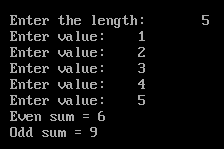
Write a program to store some numbers (How Many? will defined by user) in an array and calculate the sum of odd and even numbers. 
#include<iostream.h>
#include<conio.h>

void main()
{
 clrscr();
 int a[20];
 int esum=0, osum=0, i, c;
 cout<<"Enter the length:\t";
 cin>>c;
 for(i=0;i<c;i++)
 {
  cout<<"Enter value:\t";
  cin>>a[i];
  if(a[i]%2==0)
  {
   esum=esum+a[i];
  }
  else
  {
   osum=osum+a[i];
  }
 }
 cout<<"Even sum = "<<esum<<endl;
 cout<<"Odd sum = "<<osum<<endl;
 getch();
}
Explanation of the program
Variables declared are:
Array of size 20 (int a[20]);
Three integers esum for even numbers, osum for odd numbers, i for loop and c for length which user will define. 
Now firstly we took input from the user and stored that in the variable c.

Now suppose c = 5. 
Now what the for loop will do?
It will checks the expression which will initialize i with zero (i=0), and then it will checks the condition (i<c) which is true (0 is less than 5) so the control will come inside the loop. 
Now it will print the message that enter a value, and will take an input from the user and which will store in the ith position of the array a, so the value of i is zero (i=0), so the value will stored in the first position a[0]. 

Suppose the value entered is 1 i.e. a[0] = 1;
Now the control will come in the if expression and will check that a[0] % 2 is equals to zero or not, which is not true (1%2 is not equals to 0) so the control will left the statements under if and will comes to else part in else part 
osum = osum + a[0] (osum = 0, defined initially and a[0] = 1)
So now, osum will be assigned as 1 (osum + a[0] -> 0 + 1 = 1)

Now the statements under loop is finished so the loop will go to the last expression which is i++, value of i was initially 0 and it will be incremented by 1 so it will became 1 (i++ = 1), now the loop will again checks for the condition (i<c) which is true (1 is less than 5). 

Now the control will come inside the loop and will ask to input the value and store it on the ith position of array a, the value of i is currently 1, so the value will stored on a[1];

Suppose the value entered is 2 i.e. a[1] = 2;
Now the control will check the expression inside if (a[1] % 2 == 0) which is true (2 % 2 == 0), so the control will come inside if and will perform 
esum = esum + a[1] (esum = 0, defined initially and a[0] = 1)
So now, esum will be assigned as 2 (osum + a[0] -> 0 + 2 = 2)

Now the statements under loop is finished so the loop will go to the last expression which is i++, value of i is currently 1 and it will be incremented by 1 so it will became 2 (i++ = 2) and it will again checks the expression (i<5) which is true (2 < 5) and will repeat the same process until the expression will not become false. 
Output of The Program

Saturday, 12 January 2013

break

The break statement is a jump instruction and can be used inside a switch construct, for loop, while loop and do-while loop. The execution of break statement causes immediate exit from the concern construct and the control is transferred to the statement following the loop. In the loop construct the execution of break statement terminates loop and further execution of the program is reserved with the statement following the body of the loop.

Syntax
break;

Example
#include<iostream.h>
#include<conio.h>

void main()
{
  int i;
  while(1)
  {
    cout<<"Enter 3 to break";
    cin>>i;
    if(i==3)
    {
      cout<<"got 3";
      break;
    }
  }
  getch();
}

Explanation of the program
The control comes inside the loop because in c++ any non zero value is considered as true so the while loop is creating an infinite loop because the expression will always remain true and from the statements within the loop it will always ask to input a value but when we will enter 3 the condition under if will be true and the control will go inside the if block and will print the message got 3 and will break the loop. 

Thursday, 10 January 2013

For Loop

The mostly used loop function. It is having three parts, initialization, test expression, update expression.

Syntax

for(initialize variable; test expression; update expression)
{
  statement 1;
  statement 2;
  statement n;
}

Example
Write a program to print a number 5 times.

#include<iostream.h>
#include<conio.h>

void main()
{
  int i,j=10;
  for(i=0;i<5;i++)
  {
    cout<<j<<"\t";
  }
  getch();
}
Explanation of the program 
The control comes to the loop and initialized the variable as 0 (i=0), then it checks the expression that is true (0 is less than 5), when it founds the condition true it comes inside the loop and executes the statements within the loop, here it prints the value of variable j which is 10, now after completing the executions of the statements within the loop it goes the the third part of updating the expression which is i++, by this the value of i is incremented by 1 and the value becomes 1 (0++ = 1), now again it checks the expression and found it true (1 is less than 5) this process repeats until the expression don't become false.

Do While Loop

It is a bottom tested loop. This loop first goes inside the loop and then checks the expression so if the expression is not true then the loop will executes at least once.
Syntax
do
{
  Statement 1;
  Statement 2;
  Statement n;
}
while (test expression);

Example
#include<iostream.h>

void main()
{
  char a;
  do
  {
    cout<<"Want to continue?\n";
    cout<<"Press Y\n";
    cin>>a;
  }
  while(a=='Y');
}

Explanation of the program
The control comes inside the loop and prints the message then takes the input with the input function. Then the loop checks the expression. Suppose we entered Y, then the loop will check its expression and found that it is true so the loop will again be execute and will give message to the user for input and the loop will break when the user will enter any other value.
Output of the Program

Wednesday, 9 January 2013

While Loop

It is a looping statement, it checks the test expression before going inside the loop so it will not evaluate if the expression given is false initially. It is a top tested loop.

Syntax
while (expression)
{
   statement 1;
   statement 2;
   statement n;
   update expression
}

Example
Write a program to print numbers from 1 to 10.
#include<iostream.h>
#include<conio.h>

void main()
{
clrscr();
int i=1;
while (i<11)
{
cout<<i<<endl;
i++;
}
getch();
}
Explanation
The value of integer i is initialized with 1. The control checks the expression of while that it is less than 11 or not, and founds it true (1 < 11 = True) and gets inside it and prints the value of i and after that with i++ the value of i incremented by 1 so now the value of i is 2 again it comes to check the expression and found that it is true because 2 is also less than 11 again it comes inside the loop and prints the value of i, this process continues unless and until the expression don't become true. When i reaches 11 then the expression becomes false (11 is not less than 11) and the loops breaks. 

goto

This function is used to deviate the normal program function, it transfers the control to some other part of program.

Syntaxt
goto label;
with this we can go to the level, but we need to create the label also the syntax of creating a label is
label_name:

Example
#include<iostream.h>
#include<conio.h>

void main()
{
clrscr();
goto a;
b:
cout<<"to ";
goto c;

c:
cout<<"Absolutestuffs";
goto d;

a:
cout<<"Welcome ";
goto b;

d:
cout<<".com";

getch();
}

Explanation of the program
The control comes inside main and finds the function goto, it sends control to the label a and in label a from the output function the message is printed to the screen.
Now the control finds the function goto again and it sends the control to the next label b and so on.
Output of the above program

Wednesday, 2 January 2013

Switch

Multiple if can be very complex if there are a lots of conditions and for menu driven programs if else will be very complex, in these type of conditions using switch is very good idea it will reduce the complexity of the program.

Syntax
switch (expression)
{
   case 1:
      statements; break;
   case 2:
      statements; break;
   .
   .
   case n:
      statements; break;
   default:
      statements; break;
}

Example
Write a program that will add, subtract, divide and multiply two integers according to user's choice.
#include<iostream.h>
#include<conio.h>

void main()
{
  int a,b,r,choice;
  cout<<"Enter two numbers\n";
  cin>>a>>b;
  cout<<"Enter your choice\n";
  cout<<"1. Add"<<endl;
  cout<<"2. Subtract"<<endl;
  cout<<"3. Multiply"<<endl;
  cout<<"4. Divide"<<endl;

  cin>>choice;

  switch(choice)
  {
    case 1:
      r=a+b;
      cout<<r; break;

    case 2:
      r=a-b;
      cout<<r; break;

    case 3:

      r=a*b;
      cout<<r; break;


    case 4:

      r=a/b;
      cout<<r; break;


    default:
      cout<<"Invalid Input\n";
  }
  getch();
}


Explanation of the program
Step 1: Two variables (a and b) for storing the integers, one variable ( r ) for storing the result and one variable for switch (choice) of integer data type are declared. 

Step 2:  Message is given to the user that enter two numbers. 

Step 3: The values of a and b is taken by the input function. 

Step 4:  Now the message is given to the user that what operation he want to perform on the integers. endl works same as "\n". endl means end of line so it is also used for new line.  

Step 5: Now the value of choice is taken from the user by input function. 

Step 6: Now we are switching the choice by the switch function, suppose user entered 3, now the control will leave the other cases and will directly come to case 3 and will executes the statements of case 3, and for stopping the control from going to the next case we use break function.

If the user will enter any value which is not between the cases means not between 1 to 4 the control will go to default and will execute the statements from default. 
Output of The Above Program

Tuesday, 1 January 2013

if else

if
It is a conditional branching statement, it evaluates a statement or a group of statement if the condition is true.

Syntax
if (condition)
   statement; 

or

if (condition)
{
    statement 1;
    statement 2;
    .
    .
    .
    statement n;
}

if condition executes the statement next to if, for more than one statements to be executed, we need to put the statement in a particular block ({ }).

if else
It is also a conditional branching statement. It is having two parts one is if and other is else. If the if part is true then the statements under if will executed or if the if part is false then statements under else part will be executed.

Syntax
if (condition)
    statement;
else
    statement;


or

if (condition)
{
    statement 1;
    statement 2;
    ...
    statement n;
}

else

{
    statement 1;
    statement 2;
    ...
    statement n;
}

Same as if , if we have more than one statements to be executed we need to place them in a block.

if else if 
Third and last part, in it we can create as many conditions as we want.

Syntax
if (condition)
    statement;
else if (condition)
    statement; 
else if (condition)
.
.
else 
    statement; 


or 


if (condition)
{
    statement 1;
    statement 2;
    statement n;
}

else if (condition)

{
    statement 1;
    statement 2;
    statement n;
}


else if (condition)

{
    statement 1;
    statement 2;
    statement n;
}

.
.
.
else 

{
    statement 1;
    statement 2;
    statement n;
}

Example 1
Write a program to input a number and find whether the number is even, odd, positive or negative.
#include<iostream.h>
#include<conio.h>

void main()
{
  int a;
  clrscr();
  cout<<"Enter a Number:\t";
  cin>>a;
  
  if(a==0)
    cout<<"Neutral";
  
  else if(a>0)
  {
    cout<<"Positive and ";
    if(a%2==0)
    cout<<"Even";
    else
    cout<<"Odd";
  }

  else 
  {

    cout<<"Negative and ";
    if(a%2==0)
    cout<<"Even";
    else
    cout<<"Odd";
  }
  getch();
}
Explanation of the above program
At first control comes to main, screen cleared with clrscr, and then a variable a of integer type declared.
A message for entering number is displayed by the cout function and then the input of that number is taken by cin.

now lets suppose we entered 3
control will come to the first condition that is 3 (value of a) equals to 0, the condition is false 3 is not equal to zero, the statement next to if will not executed.

Control will come to the next condition (else if) and will check that is 3 greater than zero, the condition is true   (3 is greater than zero) now the control will come inside the condition and will execute the first line
and with the output function Number is positive line will be printed to the output screen.

Now, control is inside the next if condition placed inside else if, using if under an if condition is called as nested if.

Control will check that is a%2 equal to zero, the condition is false because 3 % 2 is not equal to 0, statement next to this if  not executed and the else part will be executed that is even.
Output of the Above Given Program