
Suppose you need to take input of 10 integers and you have to add them. Now if you will declare 10 different variables and will take 10 individual inputs then it is very difficult and complex, so here we can use an Array of integer data type.
What is an Array?
Array is a collection of homogeneous elements.
Syntax
Array index starts from 0 so we can take input by writing
We can use loop to reduce the complexity, instead of writing the above long statement for taking input we can take input by looping
Example
Write a program to store some numbers (How Many? will defined by user) in an array and calculate the sum of odd and even numbers.
Variables declared are:
Array of size 20 (int a[20]);
Three integers esum for even numbers, osum for odd numbers, i for loop and c for length which user will define.
Now firstly we took input from the user and stored that in the variable c.
Now suppose c = 5.
Now what the for loop will do?
It will checks the expression which will initialize i with zero (i=0), and then it will checks the condition (i<c) which is true (0 is less than 5) so the control will come inside the loop.
Now it will print the message that enter a value, and will take an input from the user and which will store in the ith position of the array a, so the value of i is zero (i=0), so the value will stored in the first position a[0].
Suppose the value entered is 1 i.e. a[0] = 1;
Now the control will come in the if expression and will check that a[0] % 2 is equals to zero or not, which is not true (1%2 is not equals to 0) so the control will left the statements under if and will comes to else part in else part
osum = osum + a[0] (osum = 0, defined initially and a[0] = 1)
So now, osum will be assigned as 1 (osum + a[0] -> 0 + 1 = 1)
Now the statements under loop is finished so the loop will go to the last expression which is i++, value of i was initially 0 and it will be incremented by 1 so it will became 1 (i++ = 1), now the loop will again checks for the condition (i<c) which is true (1 is less than 5).
Now the control will come inside the loop and will ask to input the value and store it on the ith position of array a, the value of i is currently 1, so the value will stored on a[1];
Suppose the value entered is 2 i.e. a[1] = 2;
Now the control will check the expression inside if (a[1] % 2 == 0) which is true (2 % 2 == 0), so the control will come inside if and will perform
esum = esum + a[1] (esum = 0, defined initially and a[0] = 1)
So now, esum will be assigned as 2 (osum + a[0] -> 0 + 2 = 2)
Now the statements under loop is finished so the loop will go to the last expression which is i++, value of i is currently 1 and it will be incremented by 1 so it will became 2 (i++ = 2) and it will again checks the expression (i<5) which is true (2 < 5) and will repeat the same process until the expression will not become false.
What is an Array?
Array is a collection of homogeneous elements.
Syntax
data_type array_name[size];
So if we need to store 10 integers in a same variable then we can writeint a[10];
Here, a variable a is declared which can store maximum 10 numbers. Array index starts from 0 so we can take input by writing
cin>>a[0]>>a[1]>>a[2]>>a[3]>>.....a[9];
Looks difficult, right?We can use loop to reduce the complexity, instead of writing the above long statement for taking input we can take input by looping
for(i=0;i<10;i++)
{
  cin>>a[i];
}
Now looks easy, lets try it in an example. Example
Write a program to store some numbers (How Many? will defined by user) in an array and calculate the sum of odd and even numbers.
#include<iostream.h>
#include<conio.h>

void main()
{
 clrscr();
 int a[20];
 int esum=0, osum=0, i, c;
 cout<<"Enter the length:\t";
 cin>>c;
 for(i=0;i<c;i++)
 {
  cout<<"Enter value:\t";
  cin>>a[i];
  if(a[i]%2==0)
  {
   esum=esum+a[i];
  }
  else
  {
   osum=osum+a[i];
  }
 }
 cout<<"Even sum = "<<esum<<endl;
 cout<<"Odd sum = "<<osum<<endl;
 getch();
}
Explanation of the programVariables declared are:
Array of size 20 (int a[20]);
Three integers esum for even numbers, osum for odd numbers, i for loop and c for length which user will define.
Now firstly we took input from the user and stored that in the variable c.
Now suppose c = 5.
Now what the for loop will do?
It will checks the expression which will initialize i with zero (i=0), and then it will checks the condition (i<c) which is true (0 is less than 5) so the control will come inside the loop.
Now it will print the message that enter a value, and will take an input from the user and which will store in the ith position of the array a, so the value of i is zero (i=0), so the value will stored in the first position a[0].
Suppose the value entered is 1 i.e. a[0] = 1;
Now the control will come in the if expression and will check that a[0] % 2 is equals to zero or not, which is not true (1%2 is not equals to 0) so the control will left the statements under if and will comes to else part in else part
osum = osum + a[0] (osum = 0, defined initially and a[0] = 1)
So now, osum will be assigned as 1 (osum + a[0] -> 0 + 1 = 1)
Now the statements under loop is finished so the loop will go to the last expression which is i++, value of i was initially 0 and it will be incremented by 1 so it will became 1 (i++ = 1), now the loop will again checks for the condition (i<c) which is true (1 is less than 5).
Now the control will come inside the loop and will ask to input the value and store it on the ith position of array a, the value of i is currently 1, so the value will stored on a[1];
Suppose the value entered is 2 i.e. a[1] = 2;
Now the control will check the expression inside if (a[1] % 2 == 0) which is true (2 % 2 == 0), so the control will come inside if and will perform
esum = esum + a[1] (esum = 0, defined initially and a[0] = 1)
So now, esum will be assigned as 2 (osum + a[0] -> 0 + 2 = 2)
Now the statements under loop is finished so the loop will go to the last expression which is i++, value of i is currently 1 and it will be incremented by 1 so it will became 2 (i++ = 2) and it will again checks the expression (i<5) which is true (2 < 5) and will repeat the same process until the expression will not become false.
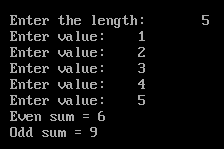 |
| Output of The Program |


